
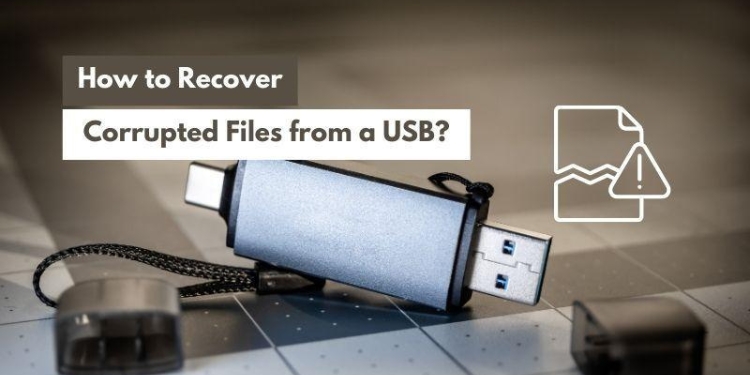
This article explains how you can recover corrupted files from a USB flash drive without compromising your data.
Nowadays, millions of people worldwide use digital solutions (like USB flash drives) to store their files. Remember, the USB drives are prone to corruption and this issue occurs due to a couple of reasons, including but not limited to sudden power loss, frequent formatting, and virus infections. Therefore, learning how to recover corrupted files from a USB is an essential skill.
This article presents effective corrupted USB drive recovery methods, such as assigning a drive letter, updating drivers, using the command prompt, and more. It also presents a commendable tool to recover data from your corrupted USBs. Let’s get into more details.
Part 1. Wondershare Recoverit: The Ultimate Solution for Corrupted Flash Drive Recovery
If you have experienced an unexpected data loss, having a dedicated data recovery tool is way better than searching for various online solutions every time you face a corrupted USB drive issue. Such utilities are designed explicitly to recover your corrupted files without compromising your stuff.
Are you looking for reliable and efficient corrupted flash drive recovery software you can count on? Wondershare Recoverit is highly recommended. If the size of your corrupted files is less than 100MB, this tool will help you restore them for free.
It works perfectly across multiple operating systems, including Windows, Linux, NAS, and Mac. If you are a new user, you can enjoy the free trial before you buy a premium plan.
Features
Some key features that set Recoverit apart from traditional recovery tools are listed below.
- It supports 1,000+ file formats and 500+ data loss scenarios, such as improper ejection, power issues, formatting, malware infection, and more.
- The user-friendly interface and easy navigation helps you perform a quick USB file recovery.
- The preview feature enables you to preview the file before you recover it.
- The deep scan ensures you recover the correct files.
- It offers a data recovery success rate of 99.5%.
- Recovery is 100% safe and secure with advanced encryption.
How to Recover a Corrupted USB Drive with Recoverit?
Are you concerned about losing the files available on your corrupt USB flash drives? Follow the steps below to get them back safely with Wondershare Recoverit.
Step 1: Download Recoverit from its official website and install the tool on your system.
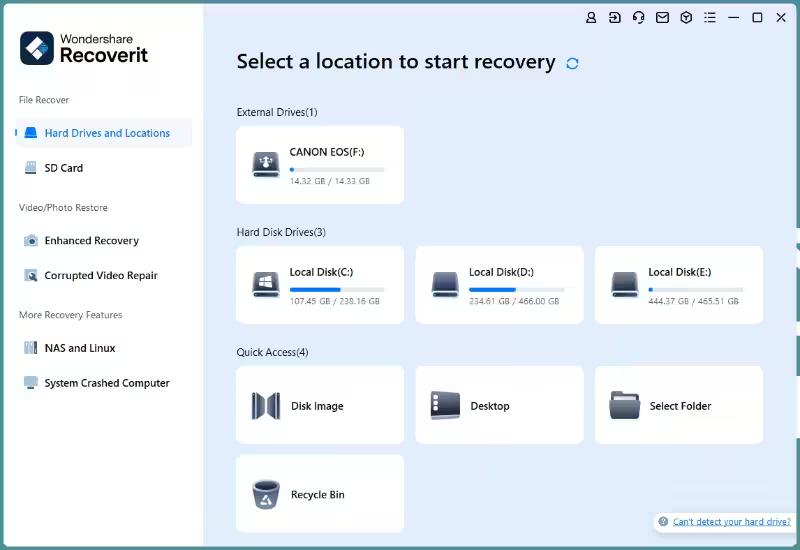
Step 2: Connect the corrupted USB drive to your system and select it as a target location from where you want to recover files.
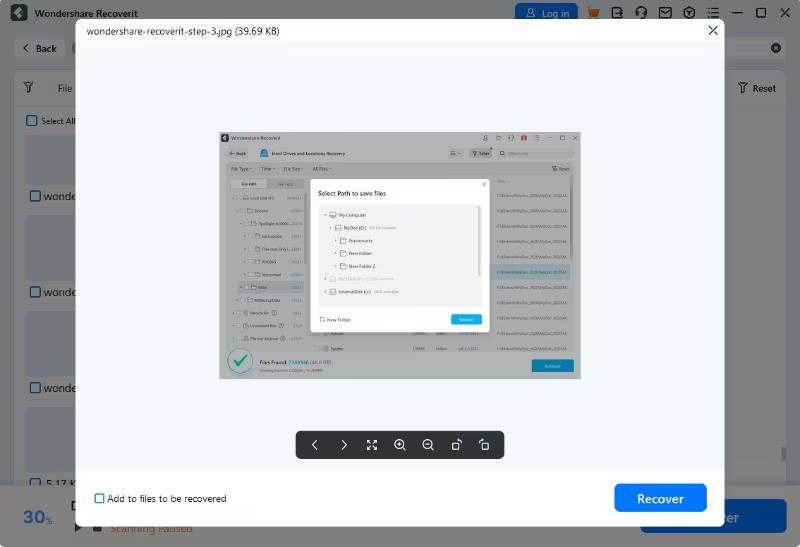
Step 3: Now, let the tool scan your USB for recoverable files. You can see the scanning progress at the bottom of the tool’s screen.
Step 4: As soon as the scan is completed, preview the files to ensure they are the correct ones.
Step 5: It is time to hit the Recover button and save the files to a safe location on your system.
Part 2. Other Methods To Recover Corrupted Files From a USB Drive
There are multiple built-in ways to recover corrupted USB drives. However, they are less reliable compared to using a dedicated, third-party tool like Recoverit. In addition, these methods are usually hard to perform, especially for individuals who are not tech-savvy. Let’s explore some options that can be a useful tool while recovering files from a corrupted USB flash drive.
- Assign a Drive Letter
Sometimes, your USB becomes inaccessible due to not assigning a drive letter. If you don’t see the USB in the File Explorer, it will still appear in the Disk Management. Changing the existing drive letter or assigning it may fix this issue. Here is how you can do that.
Step 1: Right-click the Windows Start icon. Then, tap on the “Disk Management” option.
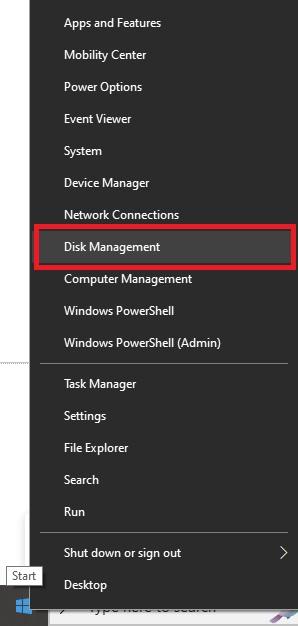
Image name: how-to-recover-corrupted-files-from-usb-2.jpg
Image alt: choose the disk management
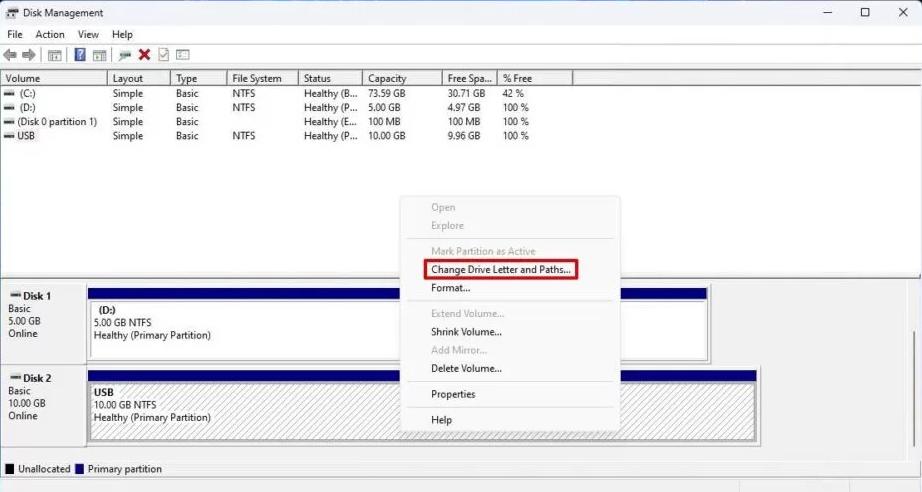
Step 2: Right-click the disk number and choose “Change Drive Letter and Paths.”
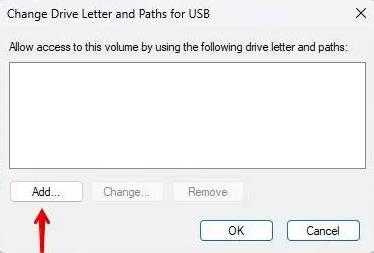
Step 3: Now, hit the Add button, as shown below.
Step 4: Open the dropdown list and select a new drive letter for your USB. Then, press OK.
Step 5: Now, use Windows Explorer to access your USB flash drive.
- Reinstall or Update Drivers
Sometimes, outdated or corrupted drivers may stop you from accessing the USB. Therefore, updating or reinstalling your corrupted USB’s drivers can help you access files from it. Follow the steps below to update or reinstall the USB drivers.
Step 1: Go to the Device Manager and expand “Disk Drives”. Select your USB, right-click on it, and choose the “Uninstall device” option, as shown below.
Step 2: Now, all you need to do is to disconnect the USB and reconnect it to your system. Windows will automatically reinstall the drivers.
Step 3: If you want to simply update the drivers to check if it works, choose the “Update driver” option, as shown in the image above.
- Using CMD to Check for Errors & File Attributes
CMD is a powerful tool that comes with Windows. It can perform a variety of functions, including making your corrupted USB drives accessible. The CHKDSK is an amazing utility to recover files from corrupted flash drives. Let’s look at how you can benefit from this utility.
Step 1: First of all, connect a corrupt USB drive to your system.
Step 2: Go to the Windows search bar, enter “CMD,” and open it as Administrator. Alternatively, you can press “Win + X” buttons from the keyboard to open the command prompt.
Step 3: Now, type the “chkdsk Y: /f” command on the prompt. You can replace the letter “Y” with your drive letter.
Step 4: Press Enter, and the CHKDSK utility will find errors on the drive and fix them.
- Using the Windows File Recovery Tool
Microsoft has launched this command-line tool to restore deleted or lost files from a USB flash drive and a range of other storage devices. This feature is available in Windows 10 and later versions. Here is how you can use this tool to recover a corrupted USB drive. Before you proceed, don’t forget to download the Windows File Recovery tool from the Microsoft Store.
Step 1: Open CMD as Administrator.
Step 2: Type and the “Winfr D: C:\Recovered /extensive” command and press Enter. Here, “D” is the drive letter and “Recovered” is the folder name on the C drive. Replace D with your drive letter.
Part 3. How To Avoid the Need for Corrupted Flash Drive Recovery?
Now that you know how to recover corrupted files from USB flash drives. It is time to learn how you can keep your USB drives away from getting corrupted. Below we have listed a few valuable tips to protect your USBs and files.
- Buy a Reliable USB: Always buy a USB from a trusted brand that manufactures premium-quality stuff.
- Don’t Store Unsafe Files: Avoid storing files on a USB that are downloaded from unreliable websites or other online sources.
- Eject Safely: Never forget to eject the USB drive safely before you remove it from the system.
- Store in a Safe Place: Always keep a USB in a safe place where there is no heat and humidity. Plus, make a habit of cleaning it regularly.
- Use Reliable Antivirus Software: Download an antivirus program and scan your USB regularly to prevent corruption.
- Format: Reformat a USB flash drive occasionally to maintain its health. Remember, frequent formatting is not recommended.
- Avoid Overfilling: Overfilling your USB with data may lead to making it inaccessible. Therefore, avoid doing so.
Last Thoughts
Out of all the data storage devices, a USB drive has a special place. It can store multiple GBs of data easily. Whether you are a student who wants to keep assignments digitally or a professional looking to save digital presentations, a USB flash drive becomes your go-to partner.
At the same time, USB flash drives can get corrupted due to many reasons like sudden power failure, virus infections, file system corruption, and more. If you are facing a similar problem, using a dedicated corrupted flash drive recovery tool like Wondershare Recoverit will be worth it.
Other methods to recover files from corrupted flash drives include using CMD, downloading the Windows File Recovery tool, assigning a drive letter, and more, as explained above.